Download and install TWINHAX in 5 steps.
From downloading the installer on the website to the app asking for your subscription key. Nothing more — the tour inside the panel is already in the other guide.
Download the installer
A single file, no loose parts. Download it straight from your website or from the Discord server.
One single .exe
There are no separate files to install — everything is packaged inside TWINHAX-Setup.exe.
Access code
The first thing the installer asks for when it opens is the access code — the app's own mark. Without this code, nothing gets extracted.
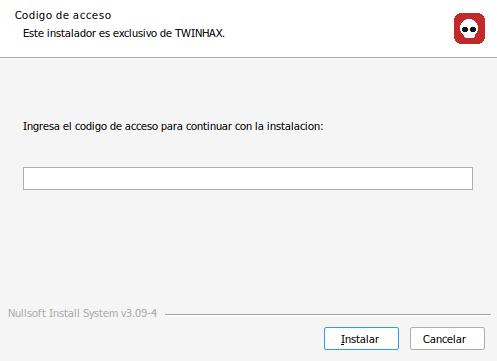
Double-click TWINHAX-Setup.exe
The wizard opens with the TWINHAX mark and asks for the code before continuing.
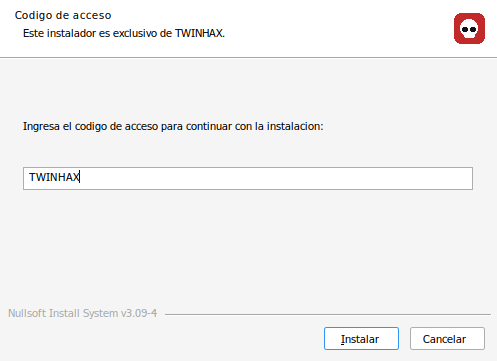
Type TWINHAX
It's the app's own name. Pressing Install is what actually starts the installation.
Installing
A progress bar while the files are copied to the user's local folder. It never asks for administrator rights.
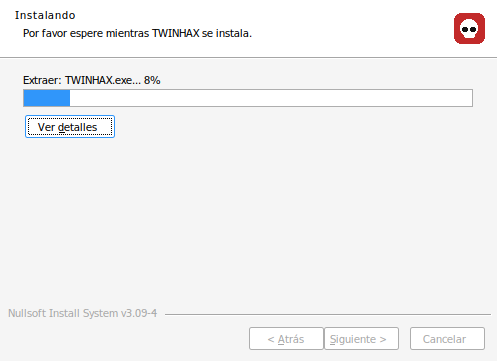
Extracting TWINHAX
Takes a few seconds. When it's done it creates shortcuts on the Desktop and Start Menu automatically.
Done — open TWINHAX
The installer's last screen, and the first thing you see when opening the app for the first time.
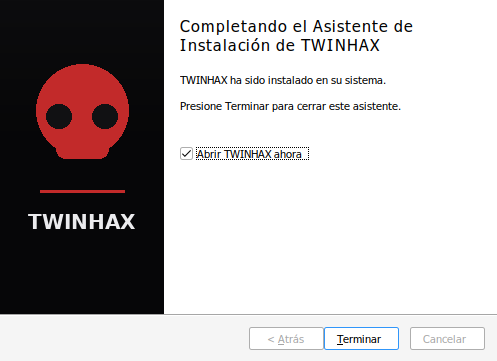
Installation complete
Press Finish to close the wizard and open TWINHAX directly.
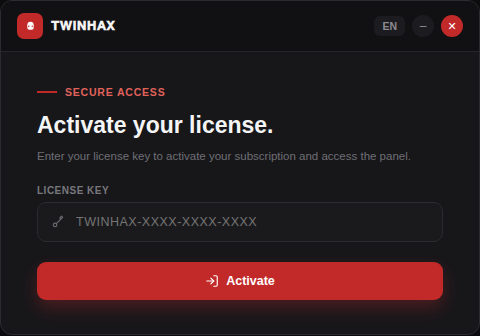
Activate your license
This is where the user enters their subscription key to get in. From here on, follow the other guide — the one for inside the panel.
End of this guideAbout this guide
The button in step 1 downloads the real installer (TWINHAX-Setup.exe) — the same file shown running in the screenshots for steps 2 to 4, the code, the progress bar and the final screen are exactly what you'll see.
Nobody sees loose files or folders — everything stays packed inside that single .exe until the moment you install it.